
Tag: Cms

  • My personal Tool-kit to drive the Digitalisation of Marketing

    My personal Tool-kit to drive the Digitalisation of Marketing

    * Cat Photo Disclaimer: apparently your content online is only open if you show adorable pet images, preferably featuring cats. So I decided to start photo shooting my cat and post it here, only to captivate more views and engagement, let’s see if that works*

    Today I want to present my strategy for navigating the complexities of modern marketing and a Tool-kit that I have used to pursue this transformation within different digitalisation projects.

    But before I want to quickly talk more about the “people” element in digital projects and how important it is to being “in love” and proud with what we do.

    Don’t get me wrong, this is not a post about how to fall in love with your company or how we should all be a “family” at work. No at all, I am very aware of having a real family and life and a professional one. But for the sake of archiving the goals we aimed to, we should really learn to work together, at best driven from the same mission. And we should really all love what we do and be 100% aware of why we are doing it.

    In my experience during the digitization or digitalisation processes, the need for constant intercommunication became particularly evident. Let’s consider how we communicate with customers, for example. Traditionally, marketing in B2B manufacturing companies relied heavily on personal interactions, as customers were considered valuable assets. This emphasis led to significant focus on activities aimed at maintaining good relationships and keeping customers satisfied and informed. The strategy revolved around nurturing strong relationships with key customers and further developing them through mutually beneficial connections. This approach ensured that industry development aligned closely with the needs of major customers, who relied on trusted partners to prioritize their requirements and ensure certain volumes or quantities.

    That is particular true in my experience during the digitization or digitalisation transformation processes. For example, let’s tak about how companies communicate with customers. In the typical scenario, marketing departments have multiple ways for engaging with customers that primarily occur on a personal level, recognizing existing customers as the most valuable assets in the company.

    This emphasis led to significant focus on activities aimed at maintaining good relationships and keeping customers satisfied and informed. The strategy revolved around nurturing strong relationships with key customers and further developing them through mutually beneficial connections. This approach ensured that industry development aligned closely with the needs of major customers, who relied on trusted partners to prioritize their requirements and ensure certain volumes or quantities.

    The companies across various industries continued to develop and innovate based on their main customers needs. The large customers would have counted on a trusted partners that were sure they would have kept prioritized their wishes and needs and would guarantee certain quantities / installations or deliveries. This is the model witnessed in many manufacturing B2B industries for the last decades. Actually a good model that would perform and keep the economy stable as in constant balance between customer – industry needs.

    However, with the advent of globalization and digitalisation, this model began to undergo significant changes. The effects were initially felt in the manufacturing and production sectors, with processes becoming more specialized and production outsourced. While this initially led to financial benefits, digitalization facilitated constant communication and increased transparency among producers of similar products. Consequently, industries (across various markets) began exploring partnerships beyond the traditional big manufacturers, opening up new opportunities.

    So the industry (again very broad sense, really in many different markets) was now finding the possibility to partner not only with the old “trusted” big manufacturer as they used it but it opened up a whole new world of opportunities.

    So, what did this mean for marketing and communication?

    It meant that newer companies / start-ups could adopt more agile marketing approaches, focusing less on long-standing customer relationships and more on innovative ways to find new partners. These newcomers are often smaller, younger, and characterized by a more flexible, rapid decision-making process. This shift initiated a wave of digital strategies that disrupted traditional marketing approaches that had been effective until recently.

    This evolution posed a significant challenge for larger multinational companies, which had to quickly adapt by adopting new ways of working, collaborating, and communicating with customers while maintaining established relationships and “old” ways to interact and keep them happy. This adaptation is particularly challenging given the same team dynamics and normally the same number of resources within the marketing / comm Teams.

    As we can understand, huge challenge. So how to approach this?

    This is my personal Tool-kit to support the digitalisation of marketing based on 3 Pillars:

    Digital Education – Central Framework and Local Outputs – Constant Intercommunication

    Digital Education

    It’s crucial to start educating marketing and communication teams about digital skills early on. Digital competencies are not innate. Therefore, ongoing education should be a priority, focusing not only on training sessions but also on explaining the rationale behind digital strategies during project collaboration.

    According to a study examining the effects of training and development activities on organizational innovation, the authors specifically suggested that “the training and development investments of an organization affect its innovative performance
    Their research found that when companies invest more in internal training, it leads to better interpersonal relationships and organizational learning practices. As a result, this improvement in learning and collaboration boosts the company’s ability to innovate.  

    It is critical to start as early as possible to educate the marketing and communication team about digital skills. Those skills are not assumed and do not belong the classic marketing / communication background. Even recent graduates I bet didn’t learn how to code Jave or HTML websites nor how to build a Google Analytics tag manager. Although you might not need to be an expert in all areas, if you are now in marketing and communication and want to stay in this field of the next 10 years, you need to have a higher digital knowledge than other areas.

    Over the past two decades, marketing has focused primarily on customer care, excelling in this aspect. However, it cannot be assumed that they have also developed IT/digital competencies and skills during this time.

    But in my opinion, marketing and comm people are more than open and willing to learn. So part of the job in a digital transformation is to continue educate in every possible way. It is not only making the pople attending Trainings but using every occasions to explain why things work in the way they do, what are the mechanism and background behind as well as clarify questions and doubts.

    Central Framework and Local Outputs

    Companies should provide marketing and communication teams with centrally managed tools and platforms, ensuring proper setup, compliance, and security. This allows for creative freedom while maintaining centralized control and administration.

    This is what I call a “central digital hub Spot” where the platforms and tools are managed, properly setup, ensure that they are compliant and secure. Meanwhile the “users” can be creative and use them to produce their outputs the best way they’d like.

    For example:

    • Digital Asset Management (DAM) System: A DAM system centralizes the storage and organization of digital assets such as images, videos, and documents, making it easy for the marketing team to access and share content
    • Content Management System (CMS): A centralized CMS allows the marketing team to manage and update website content, ensuring consistency across all pages and sections.
    • Customer Relationship Management (CRM) Software: A CRM system centralizes customer data and interactions, enabling the marketing team to track leads, manage contacts, and personalize marketing campaigns effectively.
    • Social Media Management Tools: These tools allow the marketing team to schedule posts, engage with followers, and analyze performance across various social media platforms from a centralized dashboard.
    • Analytics and Reporting Tools: Centralized analytics platforms provide insights into marketing performance across different channels, helping the team measure the effectiveness of campaigns and make data-driven decisions.

    Constant Intercommunication

    Working together in large projects requires continuous updates and real-time assessment. The interconnected nature of digital projects means that every step is dependent on the others, making close collaboration essential. This level of interaction facilitates the identification and resolution of issues, leveraging diverse skill sets within the team.

    Why is this level of interaction so crucial? Well, for starters, digital projects often involve a series of interconnected steps. A delay or misstep in one area can have ripple effects throughout the entire project. Without constant communication and collaboration, identifying and addressing these issues becomes exponentially more difficult.

    Furthermore, the complexity of digital projects often necessitates diverse skill sets. No one person can possess all the knowledge and expertise needed to tackle every aspect of a project effectively. By working together closely, team members can leverage each other’s strengths, fill in knowledge gaps, and ultimately produce a more robust final product.

    But let’s not sugarcoat it—constant intercommunication isn’t always easy. It requires patience, active listening, and a willingness to adapt. Frustrations will inevitably arise, whether it’s a technical glitch, a missed deadline, or a difference in opinion. In these moments, having someone to talk to, bounce ideas off of, or simply vent to can make all the difference.

    So, how can teams foster a culture of constant intercommunication? First and foremost, they need to prioritize transparency and openness. Encouraging regular check-ins, brainstorming sessions, and feedback loops can help ensure that everyone stays on the same page

  • Witch CMS (Content Management System) to chose (Part 2)

    Welcome back to the second post into the world of Content Management Systems (CMS). In our previous discussion, I talked about some technical features he fundamental aspects that lay the foundation for selecting the perfect CMS and enabling Flexibility, Customization and Multi-language.

    Ai generated image

    Today, we continue our journey, aiming to unravel additional critical criteria that should be at the forefront of your decision-making process and therefore I want to start touching the security aspect. To do that, I need to introduce two main kind of CMS: open-source and close-source.

    The Open Source, means that the code is available for everyone and a community of users can participate in fixing bugs and / or keep it updated. The close type consists on having the programs not visible and “covered” behind companies that will maintain, update and keep improving, without a shared community, in a proprietary way.

    I dwell into both advantages and disadvantages:

    Open-Source

    Popular CMS platforms are often more targeted by attackers because compromising them provides access to a larger number of websites. The source code is available to everyone and if the initial creator of the company goes bankrupt, the code remains available as well as further updates and improvements.

    According to a research published last year for the National College of Irland WordPress is the most widely used content management system (CMS), with 455 million websites supported and a 60.3% market share. 92% of the vulnerabilities found in the WordPress-powered websites are due to the third-party plugins and programming errors.

    WordPress, being the most widely used CMS, is obviously frequently targeted. However, popular CMSs also benefit from large communities that actively work on security improvements.

    To make sure that these continuous improvements actually arrive also to your website, the system uses updates. They can be small or large. WordPress makes updates all the times, especially affecting the functionalities of Plugins. Drupal has updates less frequently but normally larger and more comprehensive. The effectiveness of the update mechanism plays a crucial role in the overall security of a CMS.

    CMS platforms with automatic updates or robust update notifications make it easier for users to stay current with security patches. Downsize: each update requires adjustments in the code and in the backend, which requires programming and thus costs. Some of the large update I experienced to be quite costly (in the 5 digits) and they are mandatory and often difficult to predict how expensive they will be.

    Proprietary

    In the proprietary type it would be much more complicated to access the source software and thus crack it. But the downside for this kind of CMS is surely that the company is fully in charge and you are totally depending to the quality of the programming and the speed of fixing any errors.

    Second it could cost much more, as the company provider of the system can decide to increase the prices once you started with them to just perform updates and you have to accept it.

    The advantages of a proprietary CMS is the complete control of the source code by the creator. If you don’t want the source code tampered with, this is the alternative to choose.

    Another advantage ist that the integration with other platforms and systems is probably more seamless as both working on the latest version and most accurate version of the system. Proprietary CMS platforms often provide integrated solutions that are designed to work seamlessly together. This can lead to a more cohesive and efficient user experience, as the various components are developed and optimized by the same team.

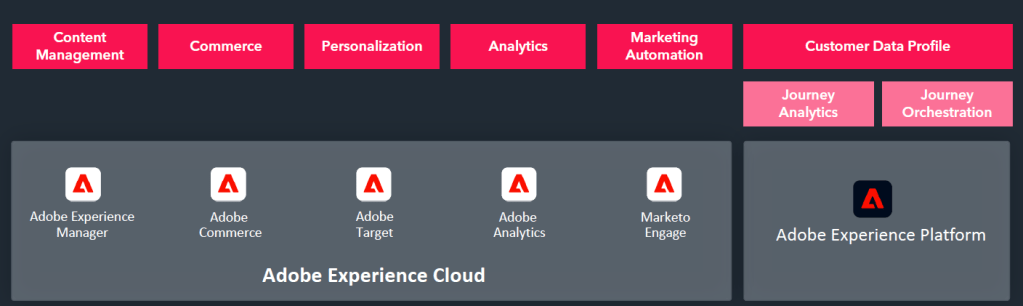
    The best example is Adobe, that offers all kind of other Solutions into the Adobe Experience Platform.

    Screenshot from Adobe Pitch Presentation

    I have never used Adobe in particular, but I did see what is capable of in one company and I was really impressed. They managed a huge integration of different e-commerce and websites, all controlled centrally and accessing the same digital assets. It would be interesting to learn if they also integrated Marketing Engagement and how that worked, especially considering the limitations or absence of GDPR prerogatives in many American Software companies.

    My experience in general is that such huge mega platforms are in theory great and surely on the long run very efficient and robust. But it takes much longer to implement everything until it works, align all the data-set, create the right structure and retrieve all the necessary data that it might discourage and / or limit the Realisation after all. Not to mention the time and commitment to train all the people working with it.

    Conclusion

    if you are not a super digital expert and you don’t want to invest huge amount of time to implement and learn how to manage a complex CMS, go for the Open Source. Also if you are not sure about the partner and you might want to keep the options open and being able to change along the way.

    If you are ready to embrace the challenge and really take the most of an integrated platforms and also you have the company back you up, then go for the close-source. Also for a security point of view, if companies treat very sensible and high risk data / products, that would be also advisable.

  • CMS (Content Management System) which one to chose (Part 1)

    Hi digital peers. Today I talk about Websites and especially I’d like to do a deep dive on the different CMS and my experience with them. On this topic there are tons of materials and information available, but again, often is “biased” by the service that cooperates with the system owners or by the agencies who can only program that platform and are “force” to promote it as better.

    To my personal experience, there is not better or worse. All systems have goods and bads and serve different purposes, it really depends what it’s needed and how the website internal the organisation will be used.

    I always think that managing a website is like taking care of a garden that keeps growing, balancing the risk of getting dried (too few contents) or over watered (too many pop-ups) and making sure insects or animal don’t penetrate it (cyber attacks) especially if the website has many different parts and languages as well as interactions.

    So, whether you’re still working on making your website better or you’ve just finished a big update, it’s a never ending job.

    As I said, today I want to focus on the CMS and share my experience with some of them, which I hope it’s valuable for others who might find themselves in the position of having to change it and don’t know which one works better for their needs.

    Disclaimer: this list was previously started from our web agency that supported us very professionally in the decision of the system. Still I added my comments and personal insights.

    Flexibility:

    1. Administrator Access:
      All systems provide access to various areas and elements of the website for administrators.

      In WordPress it’s easier to grand and change access to different kind of users since you can customize the type of access if you want to give but it’s more difficult to select users by sections (like users who only edit pages translated in one language).

      In Enterprise System (like Drupal) the access should be more regulated. You have to know in advanced in which area your areas are going to edit and what they are going to do. If at some point you decide you want users to access one part of the website and only do changes, it might be a problem. In the other hand you always have under control who does what and don’t risk any major disruptions.
    2. Customization:
      WordPress is terrible for future integration and / or scaling. The number of plug-ins that you might need and the revisions you have to perform to make sure that everything works will drive you crazy. For this reason, if you have clear defined what the website will do and what elements you need, especially if they are pretty simple, like assembling of text/images/videos and updating the blog or news page, wordpress is the way to go.
      But if you start with one structure, then on the way want to add 5 languages, then you want to integrate an automated platforms and create a download library, include a log-in a area, create a new template custom-made and apply it in all the language translated automatically, add a Chatbot, and so on…Wordpress will drive you crazy.

      For enterprise solutions like Drupal or Typo3 or any other scalable CMS systems the customisation capabilities are obviously what their strength is and where they support further developments without crashing. Even if here is also not all great. It really depends on how the “base” is constructed and what building blocks you decided at the very beginning of the set-up. Since every addition is based on a new program parts, often made from different people, it might be impossible to debug a problem or even sometimes old version don’t support new functionalities. So, true this is better with structure CMS, but still if you have to perform major change, it might be a better option to relaunch the website.
    3. Multi-language vs. Multi-Structures
      This is a crucial point of websites made for companies, especially with a complex sales structure and / or large portfolio. The main question is to decide what is more important for your company: create a base default content that will translated (with small adaptions) to various languages, Independent from the country, entity, business unit or whatever other categorization present in the organisation.

      For WordPress for example the management of multiple structure is a nightmare, if you want to differentiate one section and separate it through a different navigation, menu and URL is going to be a challenge. Same thing in Drupal where the default language is going to give you the core structure of the whole website and every page exist based on a template and “page start”.

      In other systems, like TYPO 3 or PIMCORE each page is “stand alone” and you can build it independently or create microsite with complete different contents and layout definition. For multi-domain sites with independent page structures these systems are the best one for you. But pay attention, the learning curve is much higher, they are not intuitive nor easy to handle. The users, especially if now web experts, are going to need higher amount of time to master this system. The programming is also in my experience much higher.

    This summary provides an overview of the features and considerations for each CMS based on the questions raised.