Tag: Website

  • Witch CMS (Content Management System) to chose (Part 2)

    Welcome back to the second post into the world of Content Management Systems (CMS). In our previous discussion, I talked about some technical features he fundamental aspects that lay the foundation for selecting the perfect CMS and enabling Flexibility, Customization and Multi-language.

    Ai generated image

    Today, we continue our journey, aiming to unravel additional critical criteria that should be at the forefront of your decision-making process and therefore I want to start touching the security aspect. To do that, I need to introduce two main kind of CMS: open-source and close-source.

    The Open Source, means that the code is available for everyone and a community of users can participate in fixing bugs and / or keep it updated. The close type consists on having the programs not visible and “covered” behind companies that will maintain, update and keep improving, without a shared community, in a proprietary way.

    I dwell into both advantages and disadvantages:

    Open-Source

    Popular CMS platforms are often more targeted by attackers because compromising them provides access to a larger number of websites. The source code is available to everyone and if the initial creator of the company goes bankrupt, the code remains available as well as further updates and improvements.

    According to a research published last year for the National College of Irland WordPress is the most widely used content management system (CMS), with 455 million websites supported and a 60.3% market share. 92% of the vulnerabilities found in the WordPress-powered websites are due to the third-party plugins and programming errors.

    WordPress, being the most widely used CMS, is obviously frequently targeted. However, popular CMSs also benefit from large communities that actively work on security improvements.

    To make sure that these continuous improvements actually arrive also to your website, the system uses updates. They can be small or large. WordPress makes updates all the times, especially affecting the functionalities of Plugins. Drupal has updates less frequently but normally larger and more comprehensive. The effectiveness of the update mechanism plays a crucial role in the overall security of a CMS.

    CMS platforms with automatic updates or robust update notifications make it easier for users to stay current with security patches. Downsize: each update requires adjustments in the code and in the backend, which requires programming and thus costs. Some of the large update I experienced to be quite costly (in the 5 digits) and they are mandatory and often difficult to predict how expensive they will be.

    Proprietary

    In the proprietary type it would be much more complicated to access the source software and thus crack it. But the downside for this kind of CMS is surely that the company is fully in charge and you are totally depending to the quality of the programming and the speed of fixing any errors.

    Second it could cost much more, as the company provider of the system can decide to increase the prices once you started with them to just perform updates and you have to accept it.

    The advantages of a proprietary CMS is the complete control of the source code by the creator. If you don’t want the source code tampered with, this is the alternative to choose.

    Another advantage ist that the integration with other platforms and systems is probably more seamless as both working on the latest version and most accurate version of the system. Proprietary CMS platforms often provide integrated solutions that are designed to work seamlessly together. This can lead to a more cohesive and efficient user experience, as the various components are developed and optimized by the same team.

    The best example is Adobe, that offers all kind of other Solutions into the Adobe Experience Platform.
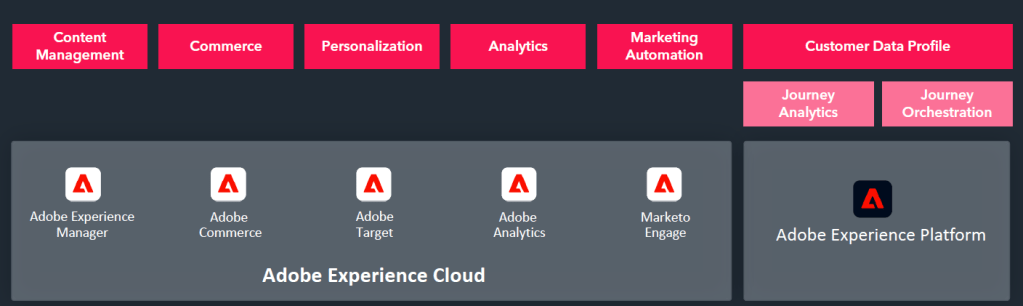
    Screenshot from Adobe Pitch Presentation

    I have never used Adobe in particular, but I did see what is capable of in one company and I was really impressed. They managed a huge integration of different e-commerce and websites, all controlled centrally and accessing the same digital assets. It would be interesting to learn if they also integrated Marketing Engagement and how that worked, especially considering the limitations or absence of GDPR prerogatives in many American Software companies.

    My experience in general is that such huge mega platforms are in theory great and surely on the long run very efficient and robust. But it takes much longer to implement everything until it works, align all the data-set, create the right structure and retrieve all the necessary data that it might discourage and / or limit the Realisation after all. Not to mention the time and commitment to train all the people working with it.

    Conclusion

    if you are not a super digital expert and you don’t want to invest huge amount of time to implement and learn how to manage a complex CMS, go for the Open Source. Also if you are not sure about the partner and you might want to keep the options open and being able to change along the way.

    If you are ready to embrace the challenge and really take the most of an integrated platforms and also you have the company back you up, then go for the close-source. Also for a security point of view, if companies treat very sensible and high risk data / products, that would be also advisable.

  • CMS (Content Management System) which one to chose (Part 1)

    Hi digital peers. Today I talk about Websites and especially I’d like to do a deep dive on the different CMS and my experience with them. On this topic there are tons of materials and information available, but again, often is “biased” by the service that cooperates with the system owners or by the agencies who can only program that platform and are “force” to promote it as better.

    To my personal experience, there is not better or worse. All systems have goods and bads and serve different purposes, it really depends what it’s needed and how the website internal the organisation will be used.

    I always think that managing a website is like taking care of a garden that keeps growing, balancing the risk of getting dried (too few contents) or over watered (too many pop-ups) and making sure insects or animal don’t penetrate it (cyber attacks) especially if the website has many different parts and languages as well as interactions.

    So, whether you’re still working on making your website better or you’ve just finished a big update, it’s a never ending job.

    As I said, today I want to focus on the CMS and share my experience with some of them, which I hope it’s valuable for others who might find themselves in the position of having to change it and don’t know which one works better for their needs.

    Disclaimer: this list was previously started from our web agency that supported us very professionally in the decision of the system. Still I added my comments and personal insights.

    Flexibility:

    1. Administrator Access:
      All systems provide access to various areas and elements of the website for administrators.

      In WordPress it’s easier to grand and change access to different kind of users since you can customize the type of access if you want to give but it’s more difficult to select users by sections (like users who only edit pages translated in one language).

      In Enterprise System (like Drupal) the access should be more regulated. You have to know in advanced in which area your areas are going to edit and what they are going to do. If at some point you decide you want users to access one part of the website and only do changes, it might be a problem. In the other hand you always have under control who does what and don’t risk any major disruptions.
    2. Customization:
      WordPress is terrible for future integration and / or scaling. The number of plug-ins that you might need and the revisions you have to perform to make sure that everything works will drive you crazy. For this reason, if you have clear defined what the website will do and what elements you need, especially if they are pretty simple, like assembling of text/images/videos and updating the blog or news page, wordpress is the way to go.
      But if you start with one structure, then on the way want to add 5 languages, then you want to integrate an automated platforms and create a download library, include a log-in a area, create a new template custom-made and apply it in all the language translated automatically, add a Chatbot, and so on…Wordpress will drive you crazy.

      For enterprise solutions like Drupal or Typo3 or any other scalable CMS systems the customisation capabilities are obviously what their strength is and where they support further developments without crashing. Even if here is also not all great. It really depends on how the “base” is constructed and what building blocks you decided at the very beginning of the set-up. Since every addition is based on a new program parts, often made from different people, it might be impossible to debug a problem or even sometimes old version don’t support new functionalities. So, true this is better with structure CMS, but still if you have to perform major change, it might be a better option to relaunch the website.
    3. Multi-language vs. Multi-Structures
      This is a crucial point of websites made for companies, especially with a complex sales structure and / or large portfolio. The main question is to decide what is more important for your company: create a base default content that will translated (with small adaptions) to various languages, Independent from the country, entity, business unit or whatever other categorization present in the organisation.

      For WordPress for example the management of multiple structure is a nightmare, if you want to differentiate one section and separate it through a different navigation, menu and URL is going to be a challenge. Same thing in Drupal where the default language is going to give you the core structure of the whole website and every page exist based on a template and “page start”.

      In other systems, like TYPO 3 or PIMCORE each page is “stand alone” and you can build it independently or create microsite with complete different contents and layout definition. For multi-domain sites with independent page structures these systems are the best one for you. But pay attention, the learning curve is much higher, they are not intuitive nor easy to handle. The users, especially if now web experts, are going to need higher amount of time to master this system. The programming is also in my experience much higher.

    This summary provides an overview of the features and considerations for each CMS based on the questions raised.

  • Soft skills needed in the Digital Journey

    The first thing that comes into our heads around the notion of digitalisation and in general the digital world is not for “listening” or “convincing techniques”. Normally we think about which programming language we should learn, what tools we should master, what platforms we should use, not to mention the whole ai “buzz” now everywhere (no ai=useless nowadays) . Yet the importance of more “personal” skills tends to be overshadowed.

    Not very often I heard about needing other more “personal” skills in relation to the success of a digital journey implementation. But ultimately, people are the primary stakeholders in any digital journey. The success of the implementation revolves around on whether they embrace and adopt the tools and processes developed. Ignoring this crucial aspect can lead to failure, as evidenced by the closure of digital startups, with people cited as the primary reason for their demise.

    Just today I read about the fail of a “digital” start-up where the CEO mentioned “people” as the first reason for its failure. He also mentioned that before having a finished product, he should have started with talking with the people first and understand their real needs. And this is exactly what I also learned in my professional experience. It doesn’t bring anything to have a perfect and ultra performing tool or platform if this is not needed or worse hated from their users.

    In my professional experience, I’ve learned that certain “personal” skills are paramount when transforming old processes into digital ones or creating new ones. Here are the skills that, in my view, are essential:

    Listening, listening and again listening


    Absolutely, I am 100% sure about listening in the first place of this list. Before diving into any initiative, it’s crucial to engage with colleagues, understand their workflows, and inquire about their current practices. For instance, again from my own experience, when we had to transition from paper forms to digital devices for collecting contact information at events (like trade-shows), instead of starting with what tool we can use, which device are compatible,… the initial question should have been: “How do we traditionally welcome customers during a physical event?”

    Asking this question helps uncover essential details such as whether each salesperson needs an individual device, if a touch-screen for attendees is more suitable, or if having a dedicated person to record information centrally is the better option. Just knowing how the Team usually interact with customers during events lead to understand if a direct collecting in our smartphone even could be a possibility, since they might be too busy talking to them or maybe they might prefer a quick scanning at visit cards and later on include eventual further information.

    These insights are only accessed through open discussions and the exchange of information. By actively listening to the team’s input, we can accurately identify the specific requirements that need to be addressed. This collaborative and communicative approach ensures that any digital implementation aligns seamlessly with existing practices and meets the actual needs of the team.

    Be Patient and Repetitive


    Assuming that a single training session or one email is sufficient for a successful digital implementation process is either living in another universe or indicative of no experience in such projects. Achieving comprehensive learning takes repetition – approximately 10 times to solidify one full understanding. It’s not a reflection of lacking skills or laziness; rather, it’s a reality that individuals juggle various tasks and challenges in their professional lives. They might not immediately apply what they’ve learned due to the demands of their roles.

    Expecting users to recall everything from a training or webinar, especially when they try the tool much later, sets the stage for frustration and disrupts the learning experience. It falls on us to be the constant support, reiterating, explaining, and training repeatedly. A positive approach, delivered with a smile and gentle guidance, is key. What may seem obvious to those immersed in the digital realm every day can be challenging for occasional users to remember. Patience and repetition become the pillars of ensuring a smooth and effective learning experience.

    Flexibility is your best friend

    Sometimes what I had in mind was very far from reality. For example I once created a perfect funnel that started from and adv in social media, followed by a series of email and ending with a 1:1 meeting with an expert.

    However, reality struck hard – the social media ads weren’t reaching the right audience, the landing page went largely unnoticed, and the expected clicks simply weren’t materializing. The entire funnel came to an unexpected halt. Internally, the follow-up process faced hurdles due to a lack of information among the experts.

    In hindsight, a major misstep was expecting our target audience to react precisely as we envisioned, not accounting for their actual behavior. I fully own up to this oversight; as digital experts, it’s our responsibility to ensure actions align with real habits rather than being overly theoretical. The key lesson here is to stay prepared for quick and frequent adaptations. Flexibility is crucial in the digital realm, where changes in strategy may be necessary to align with the audience’s actual responses rather than our anticipated reactions.

    Positive and Enthusiast no matter what


    We’re bound to face numerous challenges along the way, with significant pushback and criticism from various stakeholders. This is not surprising, considering human nature tends to resist change and new things. The fear stems from a potential loss of control over tasks and a reevaluation of one’s role in the process. People might feel redundant, especially if their responsibilities shift due to the implementation of new tools. Skepticism is also expected, as past experiences with various digital tools, some successful and others not, might breed doubt.

    In navigating these pitfalls, our role as “digital drivers” becomes pivotal. We must show and keep unwavering confidence, positivity and assurance that the changes we’re proposing are not only right but necessary. Reassuring our team that the new ways of working are well-founded and beneficial becomes a crucial aspect of steering through the uncertainties.

    Master convincing Technics

    The last critical skill for today, which I believe is indispensable, revolves around what I previously referred to as “convincing techniques” or the principles of influence. These serve as highly effective strategies for persuading and gaining the cooperation of others. This becomes particularly crucial when introducing new tools or altering processes that may initially demand more effort, risking resistance if not convincingly presented. Even if such changes are mandated from the top, success hinges on ensuring that the users are not just informed but actively brought on board. Mere decisions won’t suffice; it requires a hands-on approach, ensuring everyone feels heard and valued.

    Several influencing techniques prove valuable in this endeavor:

    1. Appeal to Emotions:

    • Engaging individuals passionate about technology, positioning the change as a revolutionary leap forward. It’s vital to be cautious, as excitement may wane if the novelty factor diminishes over time.

    2. Logical Reasoning (“Added Value”):

    • Clearly articulating the benefits the new process or features bring—whether increased efficiency, boosted sales, or other improvements. It’s crucial to consistently highlight the ultimate goals and the positive outcomes.

    3. Social Proof and Fear of Missing Out:

    • Staying informed about industry trends, learning from others, and sharing those insights within the organization. Creating a sense of urgency by looking beyond our immediate context and observing competitors. A robust network is essential for obtaining such information, as it often relies on word of mouth or connections.

    In essence, successful implementation goes beyond decisions; it requires creating a narrative that resonates emotionally, demonstrating the tangible value through logic, and staying informed through a strong network. This approach ensures not only acceptance but active participation in the envisioned change.

    Disclaimer: Images are generated through ai by the tool Canva